Closed Captions App for Real Life.
The Whole Room, in Big, Clear Words.
The RoomTalk live captions app turns the speech around you into real time captions you can actually read. Slide one switch and the last thing said stays on your screen until someone speaks again. It's the deaf and hard of hearing app that keeps you in the conversation, an app that captions conversations right there in the room, like subtitles for real life. No accounts, no internet, nothing leaves your phone.
Tap the switch 👇 to try it
Would you like your receipt in the bag?
Captions Are No Help
If You Can't Read Them in Time
For someone who reads instead of hears, words need to be big, easy to find,
and to stay put long enough to actually finish reading.
Ordinary Caption Apps
- ✕Small text in a busy, scrolling feed.
- ✕The line is gone before you finish reading it.
- ✕Menus and settings to learn before you can read.
- ✕Often stream your audio to a cloud server.
- ✕Useless with no wifi or cell signal.
- ✕Accounts and logins before you see a word.
- ✕Monthly subscriptions that never stop billing.
- ✕Ads and pop-ups crowding the words.
- ✕No easy way to re-read what was just said.
- ✕Tiny buttons that are hard for older hands.
RoomTalk
- ✓One huge caption fills the bottom half of the screen.
- ✓It holds the last line until someone speaks again.
- ✓One slide switch that is the entire control.
- ✓Everything stays on your phone, even offline.
- ✓Works with no wifi or signal, even in airplane mode.
- ✓No account, no login, no sign-up, ever.
- ✓Buy once and it is yours, never a subscription.
- ✓A clean screen with no ads and no clutter.
- ✓Tap to reopen any recent line in full.
- ✓Big text and one large control, made for older eyes.
- ✓Cleans up the cussing on the fly, so a swear lands softly as S**T, not the full word.
- ✓A built-in English dictionary that is 95%+ accurate, so you can trust the words you read.
This Is RoomTalk,
Doing Its Job
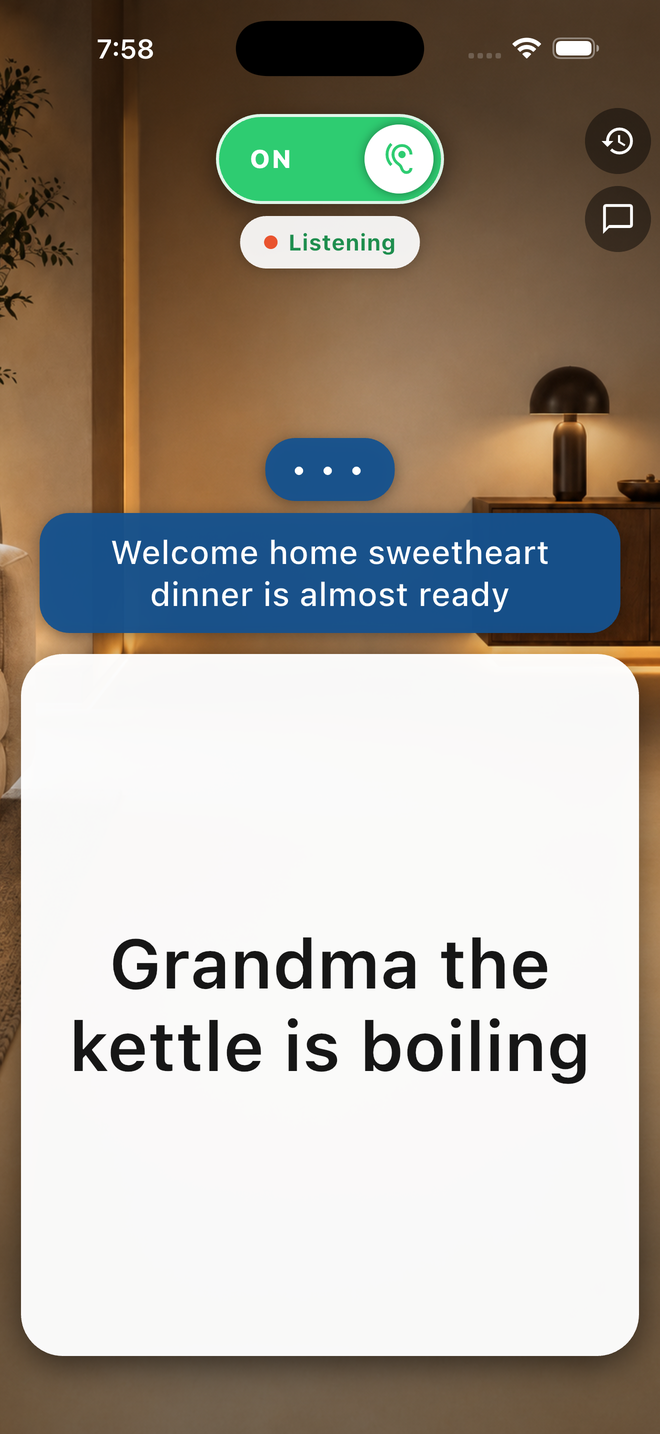
A real screenshot, not a mockup.
Someone spoke across the room, and this is what the phone showed: the last line held big and clear, the one before it waiting above.
- ✓The last line stays putuntil someone speaks again, so you can finish reading.
- ✓One switchslide it on, and the room turns into words.
- ✓All of it offlinenothing you hear ever leaves the phone.
Everything
RoomTalk Does
Dig into how the live captions app works,
what's inside, and how it keeps your conversations private.
How the Live Captions App Works
Slide one switch and nearby speech becomes big captions that hold the last line. See the three simple steps.
See how it works →Live Captioning App Features
Clean captions, saved conversations, offline speech-to-text, and more, every feature in one place.
Browse all features →Big Text Captions
Captions sized to read across the room, built large-text-first for seniors and low-vision readers.
See big text mode →Private & Offline Captions
Everything stays on your phone. No servers, no accounts, no tracking. Read how RoomTalk protects your data.
Read the privacy details →Live Captions FAQ
Quick answers about offline use, privacy, price, language filtering, and who RoomTalk is for.
Read the FAQ →Contact RoomTalk Support
Report a bug, suggest a feature, or flag words that need correction. We read every message.
Get support →Live Transcribe for iPhone
Looking for Live Transcribe on iPhone? See the real equivalent: big, clear live captions that work offline.
See the iPhone answer →Get
RoomTalk Today
A one-time $4.99 buys it outright. Now on the Apple App Store for iPhone and iPad, and available for Android direct from us. No subscriptions, no ads, no account.